
RTPS Bihar Application Status Check Online: Complete Guide
The Right to Public Service (RTPS) Bihar portal allows citizens to apply for various certificates online, including residential, caste, income, character, Non-Creamy Layer (NCL), and Economically Weaker Section (EWS) certificates. After submitting your application, tracking its progress becomes essential. This comprehensive guide explains exactly how to check your RTPS Bihar application status online, troubleshoot common issues, and access support when needed.
Understanding RTPS Bihar Portal

RTPS stands for Right to Public Service, an initiative by the Bihar government under the e-District Mission Mode Project. This online portal enables citizens to apply for and track various certificates without visiting government offices. The system streamlines public service delivery and ensures transparency in the application process.
Ready to Check Your Application Status?
Visit the official RTPS Bihar portal to track your application status instantly.
Visit Official PortalKey Services Available on RTPS Bihar
- Residential Certificate (निवास प्रमाण पत्र)
- Caste Certificate (जाति प्रमाण पत्र)
- Income Certificate (आय प्रमाण पत्र)
- Character Certificate (आचरण प्रमाण पत्र)
- Non-Creamy Layer Certificate (NCL)
- Economically Weaker Section Certificate (EWS)
- Birth and Death Certificates
- Other government services
Requirements for Checking RTPS Bihar Application Status
Before attempting to check your application status, ensure you have the following information ready:

Essential Information Required
- Application Reference Number – The unique ID received after application submission (Format: BICCO/YYYY/XXXXX)
- Applicant’s Name – Exactly as entered in the application form
- Application Submission Date – The date when you submitted your application
- Mobile Number – The number registered with your application (for OTP verification)
- Father’s Name – As entered in the application form
- Mother’s Name – As entered in the application form
Note: You can check your application status using either your Application Reference Number or through OTP verification using your registered mobile number.
Step-by-Step Guide to Check RTPS Bihar Application Status Online
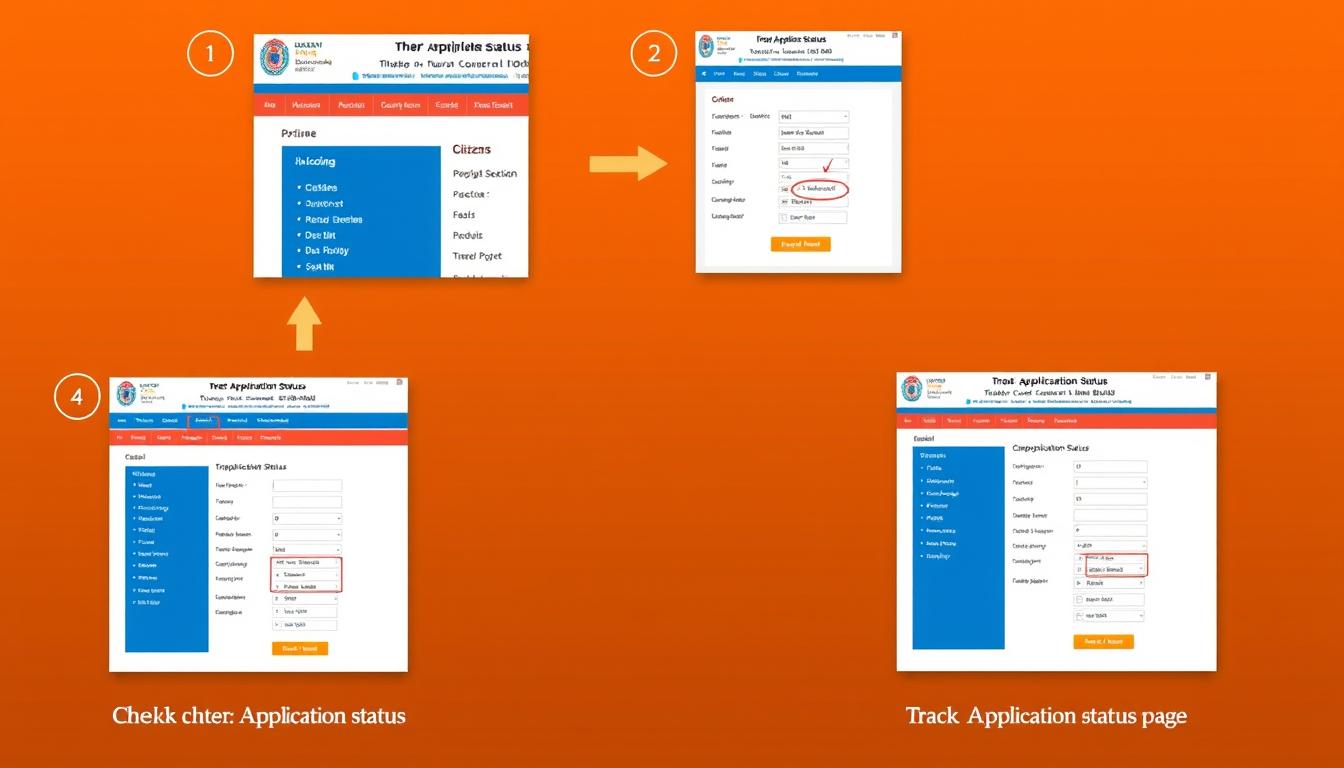
- Through Application Reference Number
- Through OTP/Application Details
- If using Application Reference Number: Enter your reference number and select either Application Submission Date or Application Delivery Date.
- If using OTP: Enter your registered mobile number to receive an OTP, then enter the OTP and your application details.

Ready to Check Your Status?
Follow these steps to quickly check the status of your RTPS Bihar application.
Track Application StatusHow to Download Your Certificate

Once your application is approved, you can download your certificate directly from the RTPS Bihar portal. Follow these steps to download your certificate:
- Application Reference Number (e.g., BICCO/2023/00000)
- Applicant Name (exactly as entered in the application)
Important: You can only download your certificate after at least 24 hours of application processing. The system may direct you to different servers (Server 1, 2, 3, etc.) for downloading your certificate.
Certificate Ready for Download?
Download your approved certificate directly from the official portal.
Download CertificateTroubleshooting Common Errors

Users may encounter various issues when checking their RTPS Bihar application status. Here are solutions to common problems:
Invalid Application Reference Number
Problem: System shows “Invalid Application Reference Number” error.
Solution:
- Double-check your reference number format (should be BICCO/YYYY/XXXXX)
- Ensure there are no spaces or special characters in the reference number
- Verify the year (YYYY) matches your application submission year
- Try the alternative OTP method if reference number verification fails
Application Not Found
Problem: System cannot locate your application.
Solution:
- Verify if your application was successfully submitted (check confirmation SMS/email)
- Ensure you’re checking on the correct portal (serviceonline.bihar.gov.in)
- Try checking after 24-48 hours of submission as new applications may take time to appear in the system
- Contact support if the problem persists
OTP Not Received
Problem: OTP not received on registered mobile number.
Solution:
- Check if you entered the correct mobile number (must be the one used during application)
- Wait for 2-3 minutes as OTP delivery may be delayed
- Check your SMS inbox for messages from RTPSBIHAR or similar sender ID
- Try the “Resend OTP” option after waiting for the cooldown period
- Use the Application Reference Number method instead
Server Busy or Timeout Error
Problem: Website shows “Server Busy” or times out.
Solution:
- Try accessing the portal during off-peak hours (early morning or late evening)
- Clear your browser cache and cookies
- Try using a different browser or device
- Check your internet connection stability
- Wait for some time and try again later

Important: If you continue to face issues after trying these troubleshooting steps, contact the RTPS Bihar support team for assistance.
Contact Information for Support

If you encounter persistent issues while checking your RTPS Bihar application status, you can reach out to the support team through the following channels:
Official Support Channels
- Email Support: [email protected]
- Helpline Number: [Helpline number will be displayed here]
- Support Hours: Monday to Saturday, 10:00 AM to 6:00 PM
- Visit in Person: Your nearest Common Service Center (CSC) or RTPS Counter at Block/SDO/DM office
When contacting support, always have your Application Reference Number and personal details ready for quicker assistance.
Information to Provide When Contacting Support
- Application Reference Number
- Full Name as in Application
- Mobile Number used in Application
- Type of Certificate Applied For
- Date of Application Submission
- Error Message Received (if any)
- Steps Already Attempted
- Screenshot of Error (if possible)
Frequently Asked Questions (FAQ)

How long does it take to process my RTPS Bihar application?
Processing times vary by certificate type:
- Residential Certificate: 7-15 days
- Caste Certificate: 7-15 days
- Income Certificate: 7-10 days
- Character Certificate: 10-15 days
- NCL Certificate: 10-15 days
- EWS Certificate: 7-10 days
These are approximate timeframes and may vary based on verification requirements and application volume.
How long is my certificate valid after issuance?
Validity periods differ by certificate type:
- Permanent Residential Certificate: Permanently valid
- Temporary Residential Certificate: 1 year from issue date
- Caste Certificate: Permanently valid
- Income Certificate: 1 year from issue date
- Character Certificate: Varies based on purpose
- NCL Certificate: Typically valid for 1 year for central government purposes
- EWS Certificate: 1 year from issue date
Can I check my application status without an Application Reference Number?
Yes, you can check your application status without a reference number by using the OTP method:
- Select “Through OTP/Application Details” on the status check page
- Enter your registered mobile number
- Enter the OTP received
- Provide additional details like name, father’s name, and mother’s name
- The system will display all applications linked to your mobile number
What should I do if my application is rejected?
If your application is rejected:
- Check the rejection reason displayed in the status details
- Correct the issues mentioned in the rejection reason
- Submit a fresh application with proper documentation
- If you believe the rejection was incorrect, visit your nearest RTPS counter or contact support for clarification
Common rejection reasons include incomplete documentation, incorrect information, or eligibility issues.
Can I apply for multiple certificates simultaneously?
Yes, you can apply for multiple certificates simultaneously through the RTPS Bihar portal. Each application will have a unique reference number, and you’ll need to track each application separately using its specific reference number.
Need to Apply for a Certificate?
Visit the official RTPS Bihar portal to apply for various certificates online.
Apply for CertificatesConclusion

The RTPS Bihar portal provides a convenient way to check your application status online without visiting government offices. By following the step-by-step guide outlined in this article, you can easily track your application, troubleshoot common issues, and download your certificate once approved.
Remember to keep your Application Reference Number and other application details safe for future reference. If you encounter any difficulties during the process, don’t hesitate to contact the RTPS Bihar support team for assistance.
Ready to Check Your RTPS Bihar Application Status?
Visit the official portal now to track your application and download your certificate.
Check Status NowTrack Your Application Status
Read this also for more information
Pradhan Mantri Matsya Kisan Samridhi Sah Yojana
Bihar RTPS Jati, Income, Niwas Certificate: आवेदन प्रक्रिया गाइड